Best Compliance Training Software and Tracking Systems






For modern HR, L&D, and compliance teams, compliance training software is no longer just a place to upload videos. It is the operational system that proves who was trained, when they were trained, which policy or course version they completed, whether their certification is still valid, and what action the organization took when someone became non-compliant.
In 2026, the strongest compliance training platforms are the ones that reduce legal risk, automate recurring training, preserve audit-ready records, and make it easy for managers and admins to act before a missed deadline becomes a regulatory problem. (For a deeper dive, read our guide on Automating Regulatory Training: How to Be Audit-Ready 365 Days a Year.)
Why Spreadsheet-Based Compliance Tracking Is a Risk in 2026
Many organizations still track mandatory training in spreadsheets. That might work for a small team with one annual course, but it breaks quickly once you add departments, countries, managers, recurring certifications, expiration dates, auditors, and historical records.
Spreadsheets create three major compliance risks.
First, they are easy to edit and hard to verify. A completion date can be changed, copied incorrectly, overwritten, or sorted into the wrong row. During an audit, that creates a problem: the organization needs to prove what happened, not simply show a cell value.
Second, spreadsheets do not manage expiration well. A safety certification, GDPR refresher, harassment prevention course, or cybersecurity training may be valid for a defined period. Once that period ends, the learner becomes non-compliant. Automating annual refresher training is the only reliable way to set it and forget it, ensuring manual tracking doesn't fail at the exact moment that matters most: before the expiry date.
Third, spreadsheets do not create an operational workflow. They do not automatically enroll missing learners, notify managers, escalate overdue training, generate certificates, or produce clean audit reports.
That is why compliance teams are moving from manual trackers to systems that combine training delivery, status monitoring, recertification logic, audit logs, certificates, analytics, and remediation workflows.
What to Look For in Compliance Training Software
The best compliance training software should do more than host courses. It should help your organization prove compliance and recover quickly when someone falls behind.
A strong platform should include:
Capability | Why It Matters |
Automated recurring compliance | Keeps annual or periodic training from becoming a manual admin task. |
Real-time compliance dashboard | Shows who is compliant, expiring soon, expired, in progress, or not started. |
Group-based assignment | Lets teams assign training by department, location, role, cohort, customer, or partner group. |
Certificates and records | Preserves proof of completion for audits and internal reviews. |
Global enrollment ledger | Gives admins one place to search all learner activity. |
Manager visibility | Allows team leads to track their own groups without full admin access. |
Audit logs and security controls | Helps IT, legal, and compliance teams verify administrative activity. |
Reporting and exports | Makes it easy to share evidence with executives or auditors. |
Built-in support workflows | Keeps training issues inside the learning platform rather than scattered across email. |
Safe deletion and archiving | Preserves historical records while reducing accidental data loss. |
Automated compliance trackinTechClass is especially strong because it brings these pieces together across learning, people management, analytics, support, configuration, and billing rather than treating compliance as a standalone checklist.
Top 10 Compliance Training Platforms Reviewed
1. TechClass: Best Overall Compliance Training Platform for Audit Readiness
TechClass is the strongest overall choice for organizations that want a modern compliance training system with automation, audit readiness, role-based access, structured learning, built-in reporting, and operational control.
TechClass is built around a practical reality: compliance is not just a course. It is a cycle. You need to create or enable training, assign it to the right audience, track completion, monitor expiry, remediate gaps, preserve records, support learners, and prove the results.
Why TechClass Ranks #1
TechClass stands out because it combines the core functions of a compliance LMS with the wider operational features that compliance teams actually need.
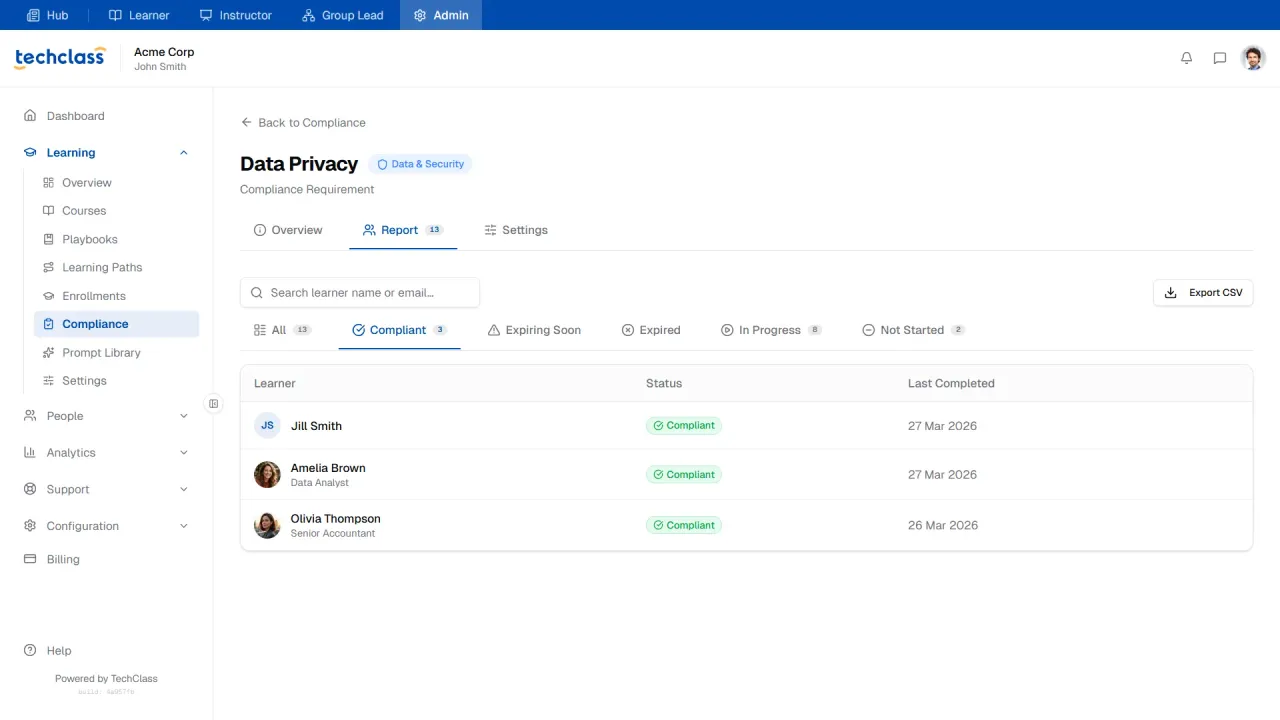
Its Compliance module allows admins to map a required course to a target group, define how long the certification is valid, set a warning period before expiration, and monitor learners across clear status categories: Compliant, Expiring Soon, Expired, In Progress, and Not Started.
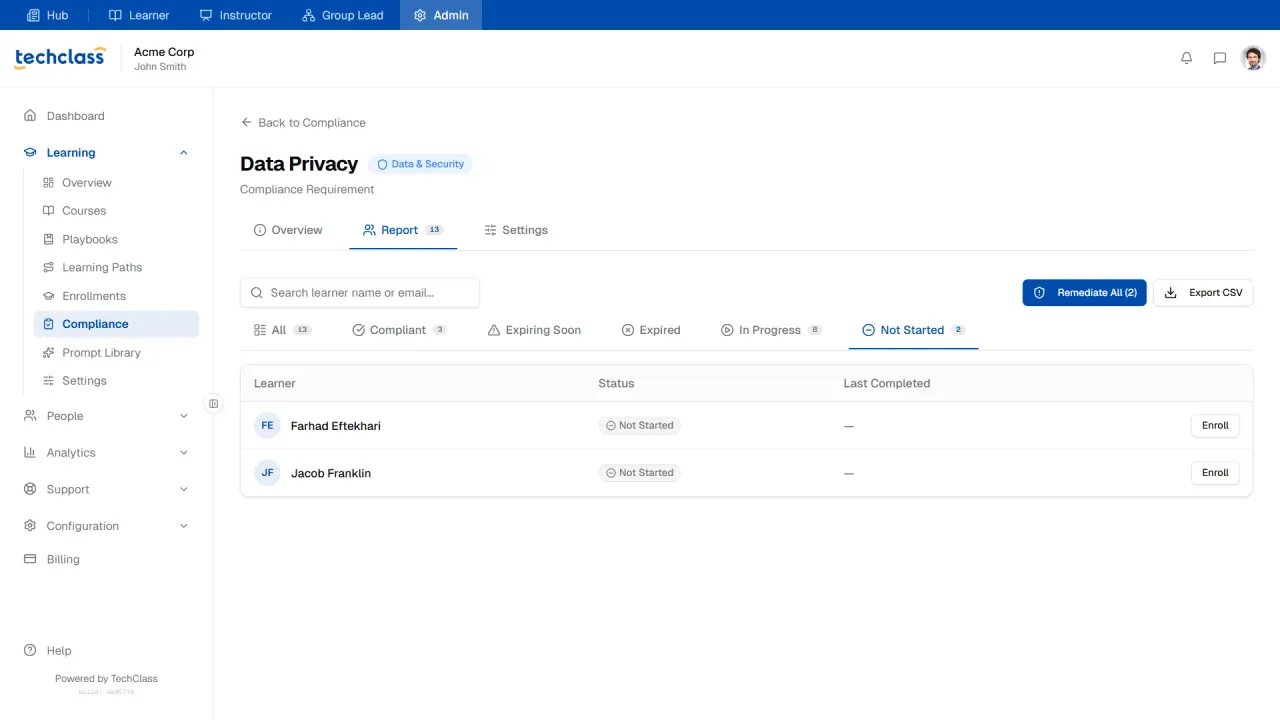
The compliance dashboard includes KPI cards, a compliance status chart, monthly completion trends, cohort filters, one-click enrollment for missing users, Remediate All for mass action, and CSV export for auditors or executives.
This matters because many platforms can show completions. Fewer platforms help admins take action quickly when learners are missing, expired, or approaching expiration.
Key TechClass Features for Compliance Teams
- Automated compliance tracking: TechClass supports recurring mandatory training such as GDPR, fire safety, cybersecurity, workplace conduct, legal training, and internal policy refreshers. Admins can define validity periods and warning windows, so the system helps surface risk before the deadline passes.
- Real-time remediation: The Remediate All workflow is one of the strongest compliance features. Instead of manually filtering a spreadsheet and enrolling users one by one, admins can mass-enroll every non-compliant learner from the compliance report.
- Global enrollment ledger: TechClass includes a master Enrollments view across the workspace. Admins can search by learner, course, status, progress, enrolled date, deadline, and completion status. This gives compliance teams both the high-level view and the individual learner trail.
- Per-enrollment detail view: Each enrollment can show expanded information such as last visit timestamp, deadline, grade, instructor feedback, internal admin notes, and manual status controls. This is especially useful when investigating whether a learner is stuck, inactive, excused, or completed through offline training.
- Certificates and historical records: TechClass preserves certificates in the user profile, allowing admins to view or download earned credentials. Archived users keep their historical training, certificates, and compliance records, which is critical for audit continuity.
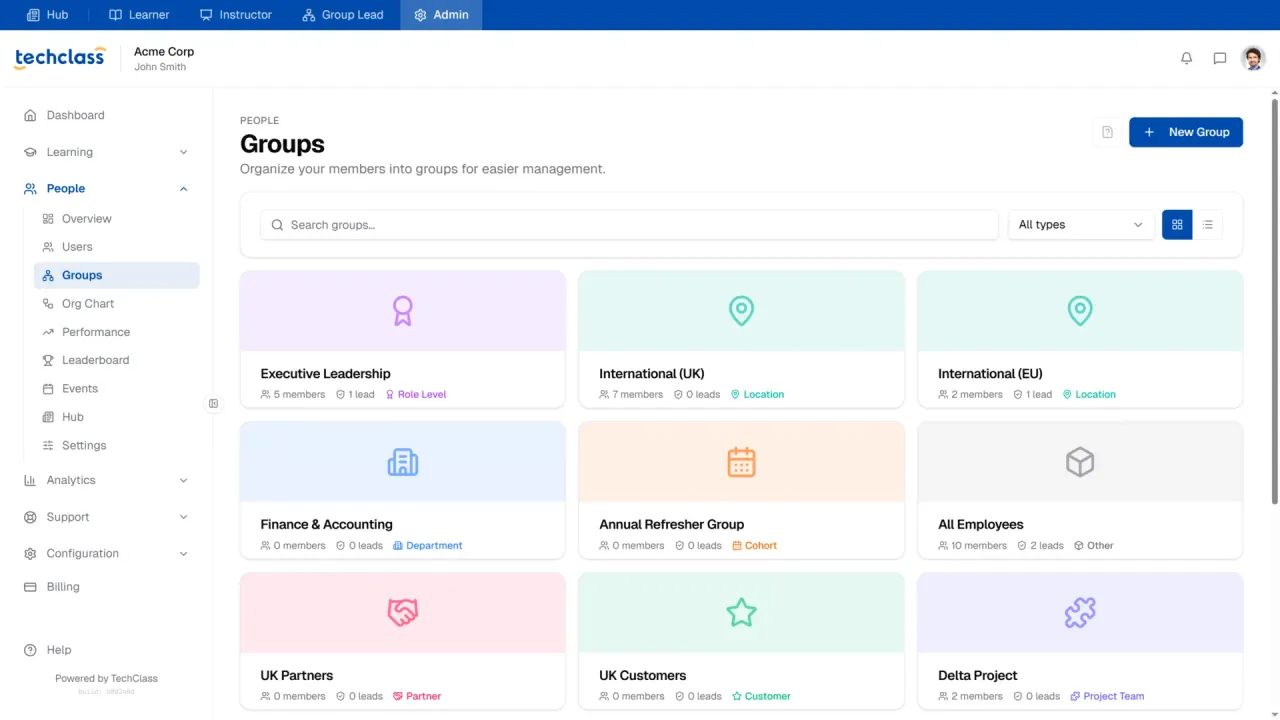
- Groups for workforce segmentation: Compliance rarely applies equally to everyone. TechClass Groups allow admins to segment learners by department, location, role level, cohort, partner, customer, project team, or other classification. Compliance requirements can then be scoped to all learners or specific groups.
- Role-based portals: TechClass uses five role-based portals: Hub, Learner Portal, Instructor Portal, Group Lead Portal, and Admin Portal. Learners see their courses, learning paths, certificates, events, support, prompts, and resources. Group leads see their team’s learners, enrollments, events, leaderboard, hub, playbooks, and prompts. Admins control learning, people, analytics, support, configuration, and billing. For compliance, this is important because managers can track their own teams without receiving full admin access.
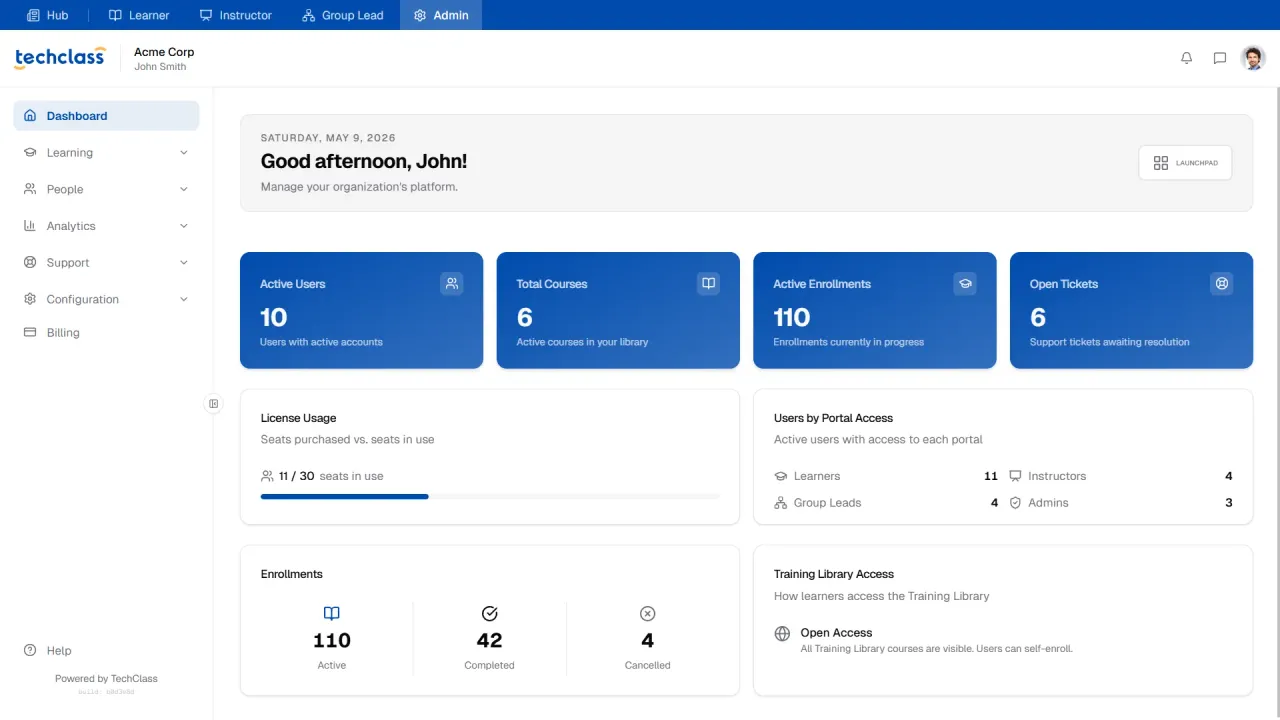
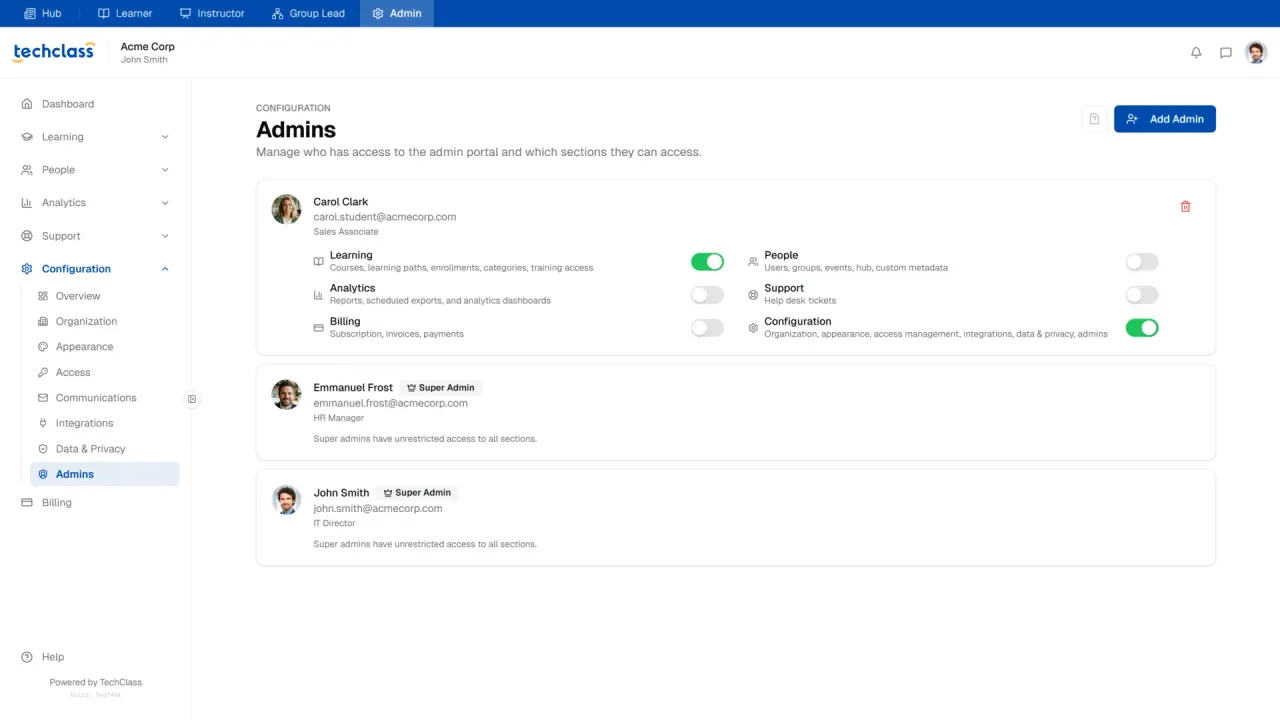
- Delegated authority without full admin rights: TechClass supports three layers of delegation: instructors for courses and playbooks, group leads for cohorts, and admins with section-based permissions. This helps companies distribute compliance operations safely without giving everyone unrestricted control.
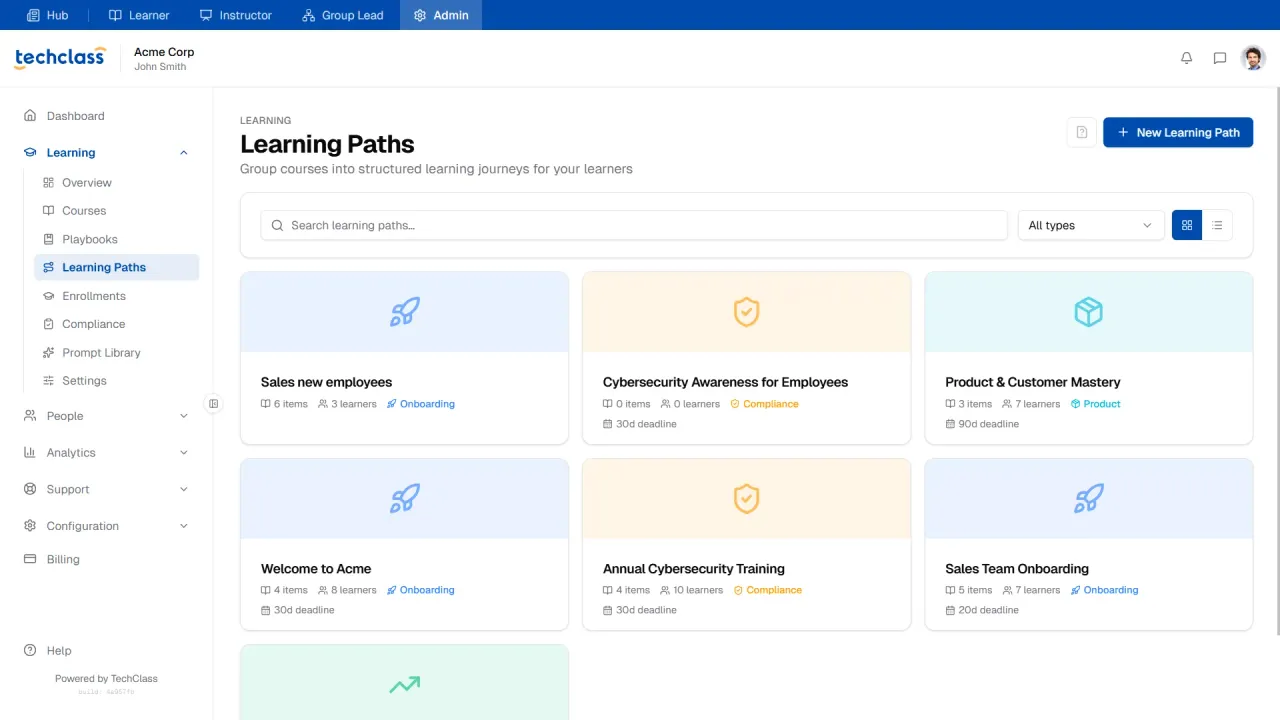
- Learning paths for structured programs: Compliance programs often involve more than one course. TechClass Learning Paths allow admins to group courses into structured journeys with relative deadlines, path-level analytics, learner progress, and granular course enrollment tracking.
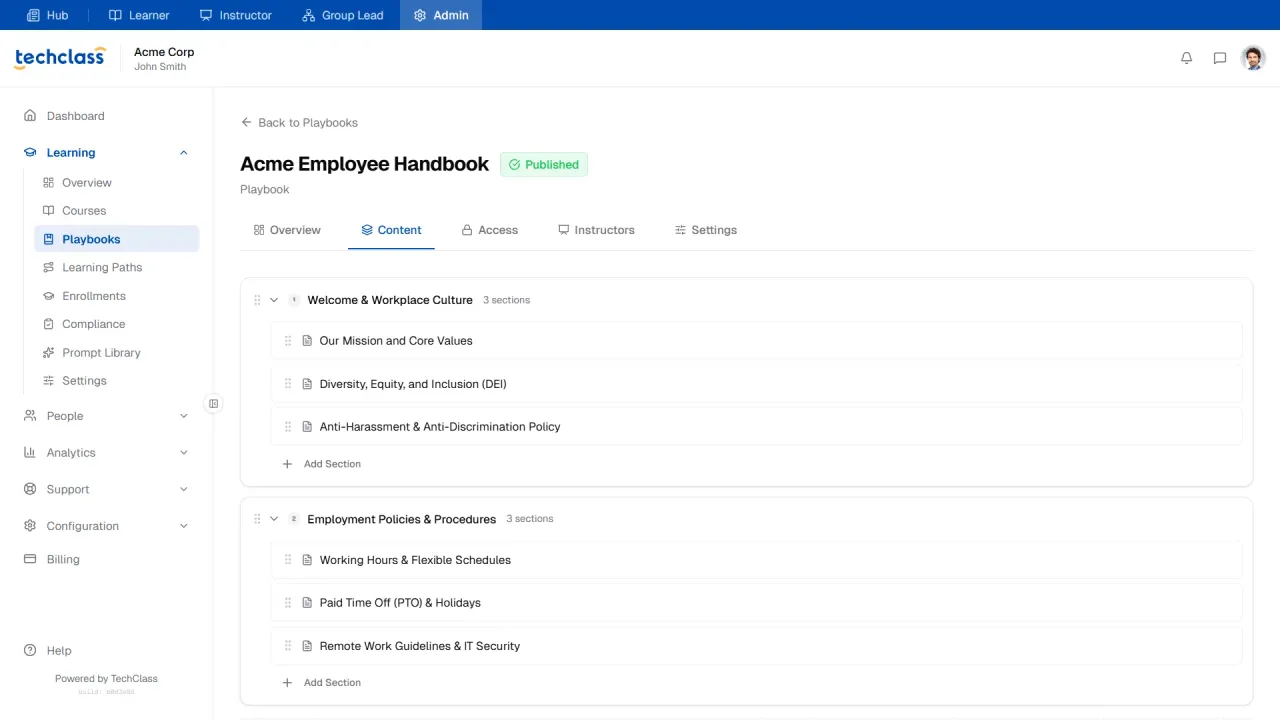
- Playbooks for policy documentation: TechClass Playbooks act as a living knowledge base for handbooks, Mastering Standard Operating Procedures (SOPs), policies, sales guidelines, security procedures, and internal standards. They include rich-text editing, file attachments, access control, restricted visibility, version history, and SME delegation.
- Insights and reporting: The Insights area gives admins cross-domain analytics across learning, people, and support. Compliance teams can review enrollment trends, top courses, completion rates, compliance health, user growth, engagement recency, support ticket volume, and resolution time.
- Built-in support and help desk: Learners can submit issues from inside the platform. Admins and instructors can resolve tickets with context, attachments, replies, status tracking, issue types, and support analytics.
- Security and access controls: TechClass includes invite-only mode, allowed email domains for public registration, IP allowlisting, audit logs, and granular admin permissions depending on plan or add-on. These controls provide the 5 security features your compliance LMS needs to satisfy ISO and SOC 2 auditors.
- Data and privacy controls: TechClass includes data hosting transparency, data export, legal resources, privacy links, Trust Center access, and secure data download workflows. These are especially useful for managing GDPR, CCPA, and AI ethics compliance and enterprise vendor review processes.
- White-label and enterprise readiness: For organizations that want a branded training experience, TechClass offers white-label features such as custom logo, favicon, custom domain, analytics tracking, and the ability to hide TechClass branding depending on plan or add-on.
Where TechClass Is Best
TechClass is best for:
- Mid-sized and growing companies that need serious compliance tracking without enterprise complexity
- Regulated teams that need recurring training, proof of completion, and audit-ready reporting
- HR and L&D teams replacing spreadsheets
- Companies that want learning, knowledge, live events, performance, support, analytics, and compliance in one system
- Organizations that want managers to track their own teams without full admin access
- Teams that need both internal training and ready-to-use learning content
2. Absorb LMS: Best for Large Global Enterprises
Absorb LMS is an enterprise LMS for large organizations with complex hierarchies, multiple regions, and dedicated administration teams. It ranks highly for large-scale compliance, but its cost and complexity make it less agile for many mid-sized teams.
Strengths: Absorb LMS offers strong reporting, enterprise scalability, hierarchy management, and administrative controls. For large organizations with thousands of employees and dedicated LMS staff, these capabilities can be valuable.
Limitations: The implementation process can be longer and more complex than what many HR and compliance teams want. Pricing can also be less transparent, and non-expert admins may find reporting and configuration difficult to manage quickly.
Best For: Absorb LMS is best for large enterprises with dedicated L&D operations, complex global structures, and the budget to support a heavier LMS implementation.
3. Litmos: Best for Large Off-the-Shelf Content Libraries
Litmos remains an option for organizations that want immediate access to a large library of generic compliance courses. However, teams should carefully evaluate content costs, add-ons, and platform flexibility.
Strengths: Litmos offers a large library of ready-made training, standard LMS functionality, and support for recurring compliance training. It can help teams move quickly when they need generic content.
Limitations: The biggest issue is total cost. Content libraries and integrations may be packaged as add-ons, which can increase the overall price. The learner and admin experience can also feel less modern than newer platforms.
Best For: Litmos is best for organizations that prioritize immediate access to a large content library and are comfortable with add-on pricing.
4. iSpring Learn: Best for PowerPoint-Based Course Authoring
iSpring Learn is a good fit for organizations that build training from PowerPoint decks and need to convert internal materials into trackable courses. It is less ideal for teams that want a fully cloud-native compliance workflow.
Strengths: iSpring is strong for course authoring, SCORM-style training, quizzes, and completion tracking. It is useful for teams that already have instructional designers working in PowerPoint.
Limitations: Its authoring strength depends heavily on desktop-based workflows. This can slow down teams that need quick browser-based updates when policies or regulations change.
Best For: iSpring Learn is best for teams with PowerPoint-heavy training processes and Windows-based course authors.
5. 360Learning: Best for Collaborative Learning
360Learning is strong for peer-driven learning and collaborative content creation, but strict compliance teams should be careful with user-generated content and version control.
Strengths: The platform encourages participation, fast content creation, peer feedback, and social learning. This can improve engagement in skills-based or culture-based programs.
Limitations: Compliance training often requires verified, approved, legally reviewed content. Too much decentralized content creation can introduce risk if employees create or modify training that should remain controlled.
Best For: 360Learning is best for companies focused on collaborative learning, internal expertise sharing, and agile training creation rather than strict top-down compliance control.
6. Kallidus: Best for Large HR-Linked Learning Programs
Kallidus is a robust learning and HR platform for larger organizations, especially in the UK and Europe. It can support compliance-heavy environments, but it may feel too resource-intensive for smaller teams.
Strengths: Kallidus offers strong HR alignment, reporting, and support for complex workforce structures. It can be useful in industries such as healthcare, manufacturing, transport, construction, and other high-risk sectors.
Limitations: The system can require more administration, training, and configuration. For mid-market teams that want fast setup and simple compliance operations, it may feel heavy.
Best For: Kallidus is best for larger organizations with dedicated HR and learning teams that need broad workforce management capabilities.
7. TalentLMS: Best for Basic Compliance Tracking
TalentLMS is easy to use and quick to deploy, but it is better suited to basic training management than high-stakes compliance governance.
Strengths: TalentLMS supports course delivery, completion tracking, learner management, and basic reporting. It is a practical starter LMS.
Limitations: For complex compliance needs, reporting depth and automation can become limiting. Teams that need detailed audit evidence, recurring certification logic, and advanced segmentation may outgrow it.
Best For: TalentLMS is best for small businesses and startups that need simple training delivery and basic completion records.
8. Trainual: Best for SOPs and Internal Process Documentation
Trainual is excellent for documenting company processes, but it is not a full compliance training system.
Strengths: Trainual provides an easy way to document how work gets done. It can improve onboarding, process clarity, and internal knowledge sharing.
Limitations: Compliance training requires more than read receipts. Many organizations need scored assessments, certificates, expiration tracking, recurring assignments, audit logs, and formal reports. Trainual is not designed as a full compliance LMS.
Best For: Trainual is best for small and growing companies that need SOP documentation and onboarding content rather than formal compliance training management.
9. ProProfs: Best for Quick Quizzes
ProProfs is useful for creating quizzes and simple assessments, but it does not replace a compliance training platform.
Strengths: The platform is simple for quiz creation, testing, and basic learner evaluation. It can be useful as a lightweight assessment tool.
Limitations: Compliance programs need governance, assignment logic, certificates, recurring training, reporting, and audit evidence. A quiz tool alone is not enough for regulated training environments.
Best For: ProProfs is best for small teams that need quick assessments, not complete compliance operations.
10. Learningbank: Best for Visual Onboarding Journeys
Learningbank is strong for onboarding journeys and employee lifecycle visualization, but it is less focused on strict compliance defensibility.
Strengths: Its visual learning lifecycle approach helps organizations structure training over time, especially for new hires.
Limitations: Teams with strict compliance requirements may need stronger reporting, easier content governance, advanced certification handling, and deeper audit workflows.
Best For: Learningbank is best for companies focused on onboarding experience and employee journey design.
Why TechClass Is the Best Compliance Training Software in 2026
TechClass connects the pieces into one operating system (LMS) for compliance learning. It gives organizations the ability to:
- Build or enable courses
- Organize training into learning paths
- Segment learners into groups
- Assign compliance requirements
- Track expiry and warning periods
- Monitor real-time compliance status
- Remediate missing learners
- Preserve certificates and completion records
- Manage global enrollments
- Delegate visibility to managers
- Support learners through help desk tickets
- Review analytics across learning, people, and support
- Control access, branding, data, privacy, and admin permissions
That combination makes TechClass especially strong for organizations that want to move beyond “we assigned the course” and toward “we can prove compliance, identify risk, and act before it becomes a problem.”
Frequently asked questions
1. What is compliance training?
Compliance training is a mandatory educational program required by laws, industry regulations, or company policies. It educates employees on workplace safety, data privacy, and ethical boundaries to prevent legal violations, regulatory fines, and reputational damage.
2. What is compliance training software, and how is it different from a standard LMS?
While a standard LMS focuses on general employee skill development, compliance training software is engineered for legal risk management. It includes specialized features like automated recertification, expiration warnings, and timestamped audit trails to legally prove employees completed mandatory training.
3. Why is tracking compliance training in spreadsheets considered a legal risk?
Spreadsheets are vulnerable to human error, missed expiration dates, and incomplete audit trails. During a regulatory audit or legal investigation, spreadsheets often fail to provide the secure, unalterable evidence required by authorities, leaving organizations exposed to massive fines.
4. What features should growing companies look for in a compliance training platform?
Regulated companies should prioritize features that reduce manual work and ensure audit readiness. Essential capabilities include automated recertification, real-time compliance dashboards, group-based course assignments, and instant remediation workflows (like the "Remediate All" button in TechClass).
5. What is the best compliance training platform?
For mid-sized and regulated companies in 2026, TechClass is the best compliance training platform. It uniquely combines audit-ready tracking, automated recertification, ready-to-use compliance content, and advanced remediation workflows into one unified, easy-to-deploy system.